
Augmentative and alternative communication (AAC) app with pictograms and voice
What ComunicaTEA is
ComunicaTEA is an augmentative and alternative communication (AAC) app. It lets a person who does not speak, or who needs support to speak, say what they want to say: they tap pictograms, the app builds the sentence and says it out loud. It is designed for people with communication support needs, at any age, and for the families and teams who support them.
App status
ComunicaTEA is in testing and will be free at launch. It will be released for Android and iOS, but it cannot be downloaded from Google Play or the App Store yet.
Join the waitlist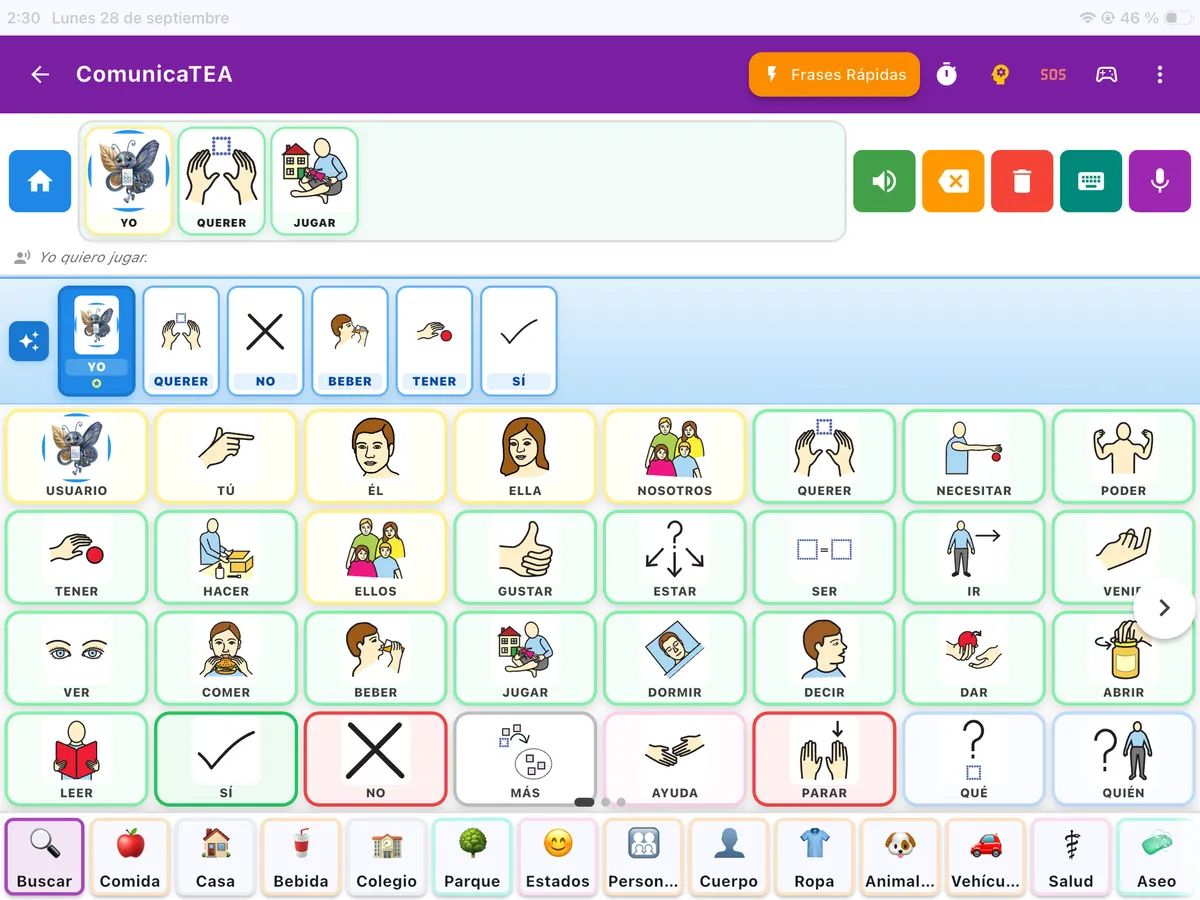
Who it is for
For anyone who needs support to communicate. For example, people with autism, cerebral palsy, Down syndrome, aphasia, developmental language disorder or a physical or motor disability, at any age.
It is also for the people around them. Families can protect the settings with an adult challenge and a PIN. Professional teams can keep several profiles on the same device, with each person’s data kept apart, which is useful in a classroom or a therapy room.
What the app does
- Pictogram communicator. A core vocabulary of 70 words and 48 topic folders, with around 1,000 words with Mulberry pictograms. When a folder is open, the core vocabulary stays on screen.
- Sentences. In English the app says the words in the order they are tapped. In Spanish, French, Italian and Portuguese it also conjugates verbs and makes words agree.
- Voice. The device’s own voice always works, also offline. Natural voices need a connection and have a usage limit.
- Quick phrases. Suggested phrases, your own phrases and recent ones, to say what is used most with a single tap.
- Everyday supports. Visual schedule, timer, First–Then board, emergency board and Relax.
- Your own words. You can add words with a photo, for example of a person or of an object at home, and hide the ones that are not used.
- Other ways to express yourself. Keyboard with autocomplete, alphabet and dictation.
- Six languages. The interface is available in English, Spanish, French, German, Italian and Portuguese.
It adapts to how each person accesses it
The board has four levels. When you move up a level, new words arrive and the ones already known do not move. When and how to start is best decided with the professionals who support the person.
- Level 1 8 words Very large cells, to get started.
- Level 2 20 words New words arrive; known ones stay put.
- Level 3 40 words More vocabulary without moving what was learned.
- Level 4 70 words The full core vocabulary.
For people with motor difficulties you can set a minimum press time, a pause between taps and the size of the targets. Switch scanning is also available. The app has text scaling, respects the system setting to reduce motion in the communicator and works with the screen reader in the communicator.
Three design decisions
- The board does not move
- Words always stay in the same place, so the hand learns where each one is. Neither prediction nor the board level reorders them. A hidden word leaves its gap and does not push the others along.
- Communicating does not depend on the internet
- Choosing a pictogram and hearing it works offline. Features that need a connection, such as natural voices, are an extra, not the path to communicating.
- It suggests, it does not decide
- Prediction suggests the next word and is calculated on the device. It never speaks for the person or says anything they have not chosen.
What to look at when comparing AAC apps
No AAC app works equally well for everyone. Before choosing, try it with the person who will use it and ask yourself, together with the team that supports them:
- whether the person can communicate without an internet connection;
- whether words always stay in the same place;
- whether the board can start with a few words and grow;
- whether it adapts to the person’s motor access;
- whether the voice is clear and in which languages it builds correct sentences;
- whether you can add your own words and photos;
- what it costs and which features are left out of the free plan.
Each criterion is explained in detail, with the questions worth asking and the most common mistakes, in the guide how to choose an AAC app.
If you have not started with pictograms yet, this guide explains the first steps at home: getting started with pictograms at home.
Frequently asked questions
What is an augmentative and alternative communication (AAC) app?
It is an app that helps people who do not speak, or who need support to speak, to communicate. The person taps pictograms, the app builds the sentence and says it out loud. AAC does not replace spoken language: it accompanies it. It is a common support in speech therapy and special education.
Is ComunicaTEA only for people with autism?
No. It is designed for people with autism and for anyone who needs support to communicate, at any age: for example, people with cerebral palsy, Down syndrome, aphasia, developmental language disorder or a physical or motor disability.
Does ComunicaTEA work in English?
The interface is available in English, along with Spanish, French, German, Italian and Portuguese. In English the app says the words in the order they are tapped: it does not conjugate verbs or make words agree. That grammar engine works in Spanish, French, Italian and Portuguese.
Does ComunicaTEA work without an internet connection?
Communicating always works offline: choosing a pictogram and hearing it does not depend on the network. Without internet you can use the board and its roughly 1,000 words with pictograms, the sentence, the device voice, prediction, the schedule, quick phrases and supports such as the emergency board or Relax. Natural voices need a connection and have a usage limit; offline, the device voice speaks.
How much does it cost and where can I download it?
It will be free at launch. It will be released for Android and iOS, but it is not available in the stores yet. You can join the waitlist to find out when you can download it.
Does word prediction decide what the person says?
No. Prediction suggests the next word based on how each person uses the app, and it is calculated on the device itself, without internet. It is not a language model. It suggests, but does not decide: it never reorders the board or says anything the person has not chosen.
Be among the first to try it
ComunicaTEA will be free at launch. Join the waitlist and we will let you know when it is ready for your device.
Join the waitlist